![GBB_Horizontal_Eco_Light.png]](https://support.greenbusinessbenchmark.com/hs-fs/hubfs/GBB_Horizontal_Eco_Light.png?height=40&name=GBB_Horizontal_Eco_Light.png)
You have all these initiatives in front of you, now you may be thinking, “where do I even start?” Here are some best practices that will help you make the most of the GBB initiatives.
Initiative best practices:
- Only complete those that fit your organization’s goals
- We provide 100’s of initiatives and 3,000+ total points to provide flexibility
- Our system is additive, not subtractive. If an initiative doesn’t apply to you then you won’t be penalized
- Use filters to sort by low-high cost, impact, and effort
- Use category filters to only see initiatives in categories that are important to you
- Use the initiative table filtering to search for specific topics
- Ex: light bulbs, diversity, landscaping
- Adjust category visibility and hide Work From Home, Social Responsibility, and Governance initiatives in account settings
- Decide internally what you want to focus on, though we recommend focusing on full ESG
- For percentage initiatives, only select the one most applicable to your organization's status at the time. You cannot stack these initiatives.
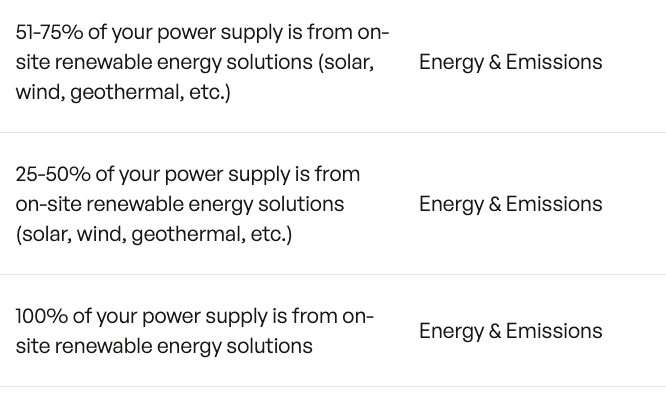
- Ex: For the below initiatives, if your organization is at 40% renewable energy, you should select "25-50% of your power supply is from on-site renewable energy solutions". If your mix of renewable energy increases to 55%, you should deselect the previous 25-50% initiative and only select the 51-75% initiative.
- Ex: For the below initiatives, if your organization is at 40% renewable energy, you should select "25-50% of your power supply is from on-site renewable energy solutions". If your mix of renewable energy increases to 55%, you should deselect the previous 25-50% initiative and only select the 51-75% initiative.
- If using Work From Home initiatives, only mark an initiative as complete if 75% or more of your employees have implemented that practice in their home offices
- If we have a set of initiatives (an industry initiative pack) for your industry, it will show up once you pick your industry in Settings & Profile
- You will then see the initiatives in the library and can track your progress in the dashboard